
1. Employee Data is understanding your employees better
Employee Data in practice means:
- A set of questions, selected by you, is shown to employees after any of our experience surveys, across all active measurement areas
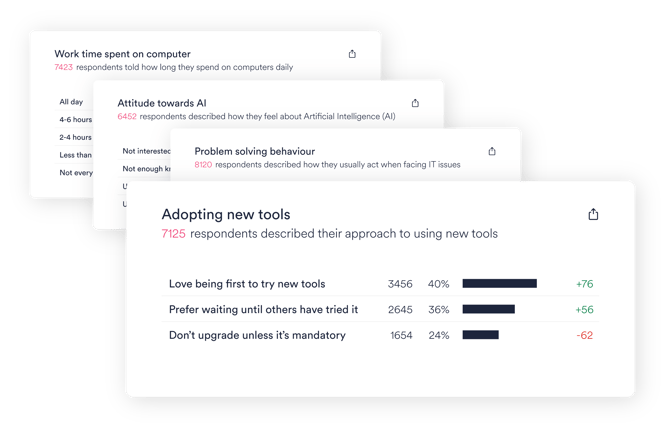
- Ready-made questions and answer options covering the following topics: Role and responsibilities, Work routines, Technology mindset, Working with AI
- The earlier existing IT support profile questions are merged into the Employee Data set
- All data is automatically linked to feedback 6 months back
2. How to start collecting Employee Data
Start collecting Employee Data with a few simple steps:
- Decide which questions to ask from a list of 13. See questions below. We recommend not to activate them all, but based on what areas of IT you measure, select 2-5 relevant questions. See our recommendation on which employee data questions to ask.
- If you choose to use the Role category question, decide on the roles (max 12 options, 6-8 recommended).
- Contact your Customer Success Manager to determine which questions to ask, and they will activate data collection by changing a few settings in your HappySignals instance.
- Employee Data questions start showing to employees immediately as follow-up questions to our experience surveys
Employee Data questions to select from:
|
QUESTION |
ANSWER OPTIONS |
|
Which one of these best matches your role? |
*** fully customized by customer *** |
|
|
|
|
Do you supervise other people? |
Yes / No |
|
|
|
|
How much do you work directly with external customers? |
Not at all Once in a while Weekly basis Daily basis |
|
|
|
|
How varied is your work on a daily basis? |
I mostly work on similar tasks each day I work on a mix of recurring and varied tasks I work on a wide variety of tasks every day |
|
|
|
|
How much of your workday on average do you spend at your computer? |
Not every day Less than 2 hours 2-4 hours 4-6 hours All day |
|
|
|
|
How much of your working time do you typically work remotely? |
None One day a week 2-3 days a week 4-5 days a week |
|
|
|
|
How would you describe your IT skills? |
I rarely need help with IT I often need help with IT I help others |
|
|
|
|
When I have a problem with my IT tools, I most likely |
Try to solve the problem by myself Just contact support Ask a colleague |
|
|
|
|
What best describes your approach to new devices and software? |
I usually don't upgrade unless it's absolutely mandatory I prefer waiting until my colleagues have tried it I enjoy being the first to try new devices and software |
|
|
|
|
How much do you use AI? |
I don’t use AI I use AI occasionally I use AI regularly in my work AI is one of my main tools at work |
|
|
|
|
How would you describe your skills in using AI tools and giving instructions to AI? |
Not skilled at all I have basic skills I have good skills I'm an expert |
|
|
|
|
How do you feel about AI in work context? |
AI has increased my stress levels at work I feel concerned about the risks and impacts I’m curious about AI but still learning I see clear opportunities in using AI at work I feel empowered and confident using AI |
|
|
|
|
How does AI impact your work? |
AI has a negative impact on my work AI creates some challenges in my work AI does not impact my work AI helps with some of my tasks AI significantly improves how I work |
3. How to analyse Employee Data
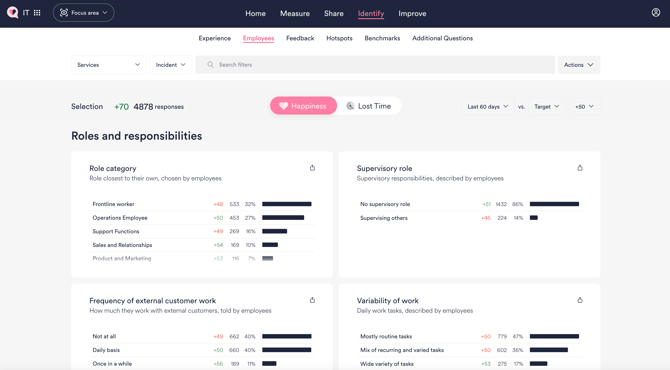
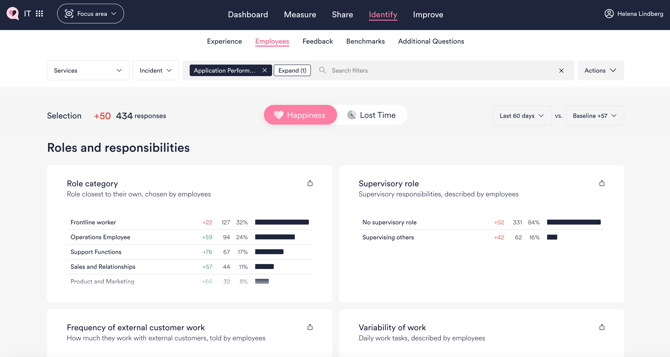
Employee Data is visible in your HappySignals instance as soon as you start collecting it. We also connect employee data to your historical experience data dating back 6 months. You can find the employee data from the following locations in HappySignals:
A. Employees page in the Identify section
B. Employee Data as a filter in the Experience view
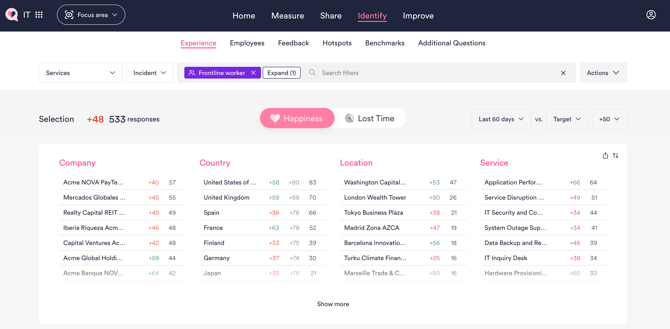
You can select a relevant Employee Data value (for example, "Frontline workers") as a filter in Experience view to see which services are causing Frontline workers the most problems or delight.
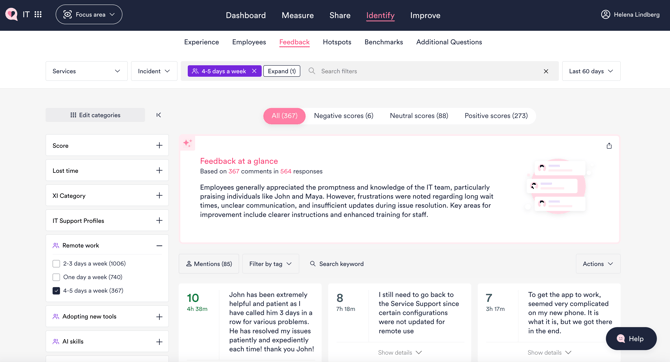
C. Employee Data as a filter in the Feedback view
You can filter open text feedback and the feedback summary by Employee Data, for example, looking into what employees working 4-5 days a week remotely say.
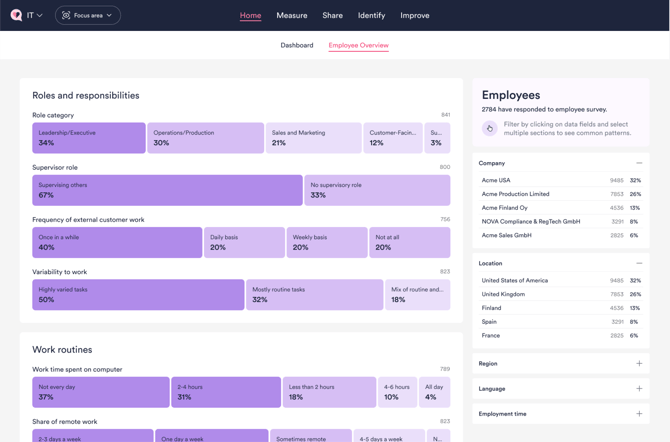
D. Employee Overview under Home
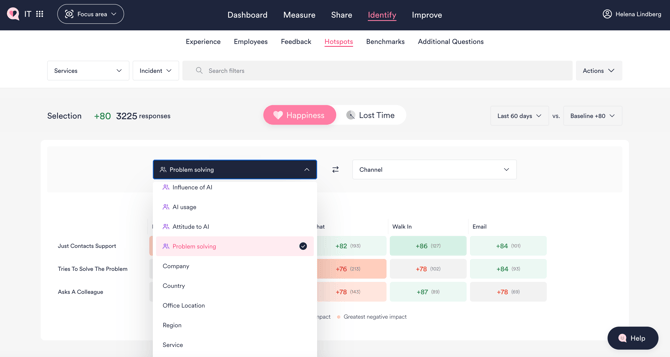
E. Employee Data selectable in Hotspots view
You can select Employee Data as the basis for your hotspots analysis.
4. Employee Data updates and skipped questions
Employee Data is collected through follow-up questions shown after experience surveys. Once an employee answers an Employee Data question, the answer is stored and used for reporting and analysis.
Can employees update their Employee Data answers?
Currently, Employee Data answers cannot be updated after they have been submitted. The response provided by the employee remains unchanged in the system.
Support for updating Employee Data responses is planned for a future product release.
What happens if a question is skipped?
Employee Data questions are optional, and employees may choose to skip a question.
When a question is skipped:
-
No Employee Data value is stored for that question.
-
The question is considered completed and will not be presented to the employee again.
-
As a result, the employee will not have another opportunity to answer that specific Employee Data question unless future product functionality provides a way to update or manage Employee Data responses.
Because skipped questions are not re-asked, we recommend carefully selecting the Employee Data questions that are most relevant to your organization before enabling data collection.
This approach keeps the survey experience lightweight while ensuring that collected Employee Data remains consistent for analysis.