
Key Takeaways
- Response rates were approximately 30% higher when surveys were delivered during local office hours.
- Employees are most likely to respond during working hours.
- Approximately 50% of survey responses are submitted within four hours of survey delivery.
- Scheduling surveys at the beginning of the workday can help maximize response rates and feedback volume.
Conclusion and recommendation
Our analysis shows that the timing of survey delivery can have a measurable impact on response rates. Across proactive surveys, response rates were approximately 30% higher when surveys were delivered during local office hours compared to surveys delivered outside working hours.
Employees are most likely to respond during normal working hours. In several countries, response rates peaked when surveys were delivered during or shortly after lunch hours. For surveys delivered through Microsoft Teams, we observed elevated response activity during the early morning hours.
Half of all responses are submitted within four hours of survey delivery, suggesting that the first few hours after delivery are critical for employee engagement.
Based on these findings, we recommend scheduling proactive surveys during employees’ working hours, preferably at the beginning of the workday, to maximize response rates and feedback volume.
How to set the survey sending time?
Customers can configure proactive survey delivery times directly in ServiceNow.
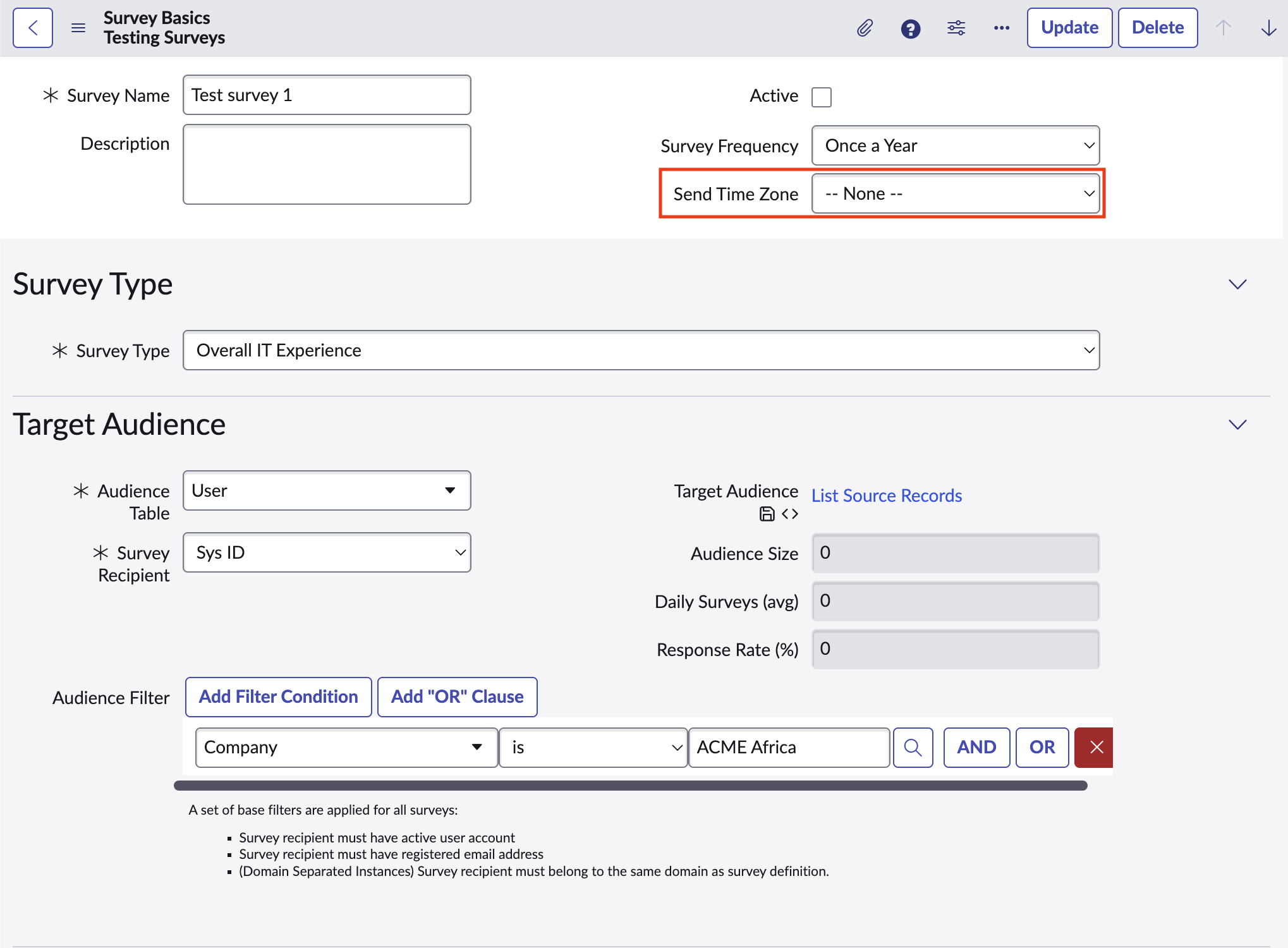
For each proactive survey, you can specify the hour at which surveys should be sent. The selected time is applied in the employee’s local time zone. ServiceNow uses employee location, country, or timezone information to determine the appropriate delivery time and automatically schedules surveys accordingly.
With timezone-based scheduling enabled in Proactive IT Experience 2.0, surveys are delivered at the same local time for each recipient, regardless of geographic location.
Configure survey sending time
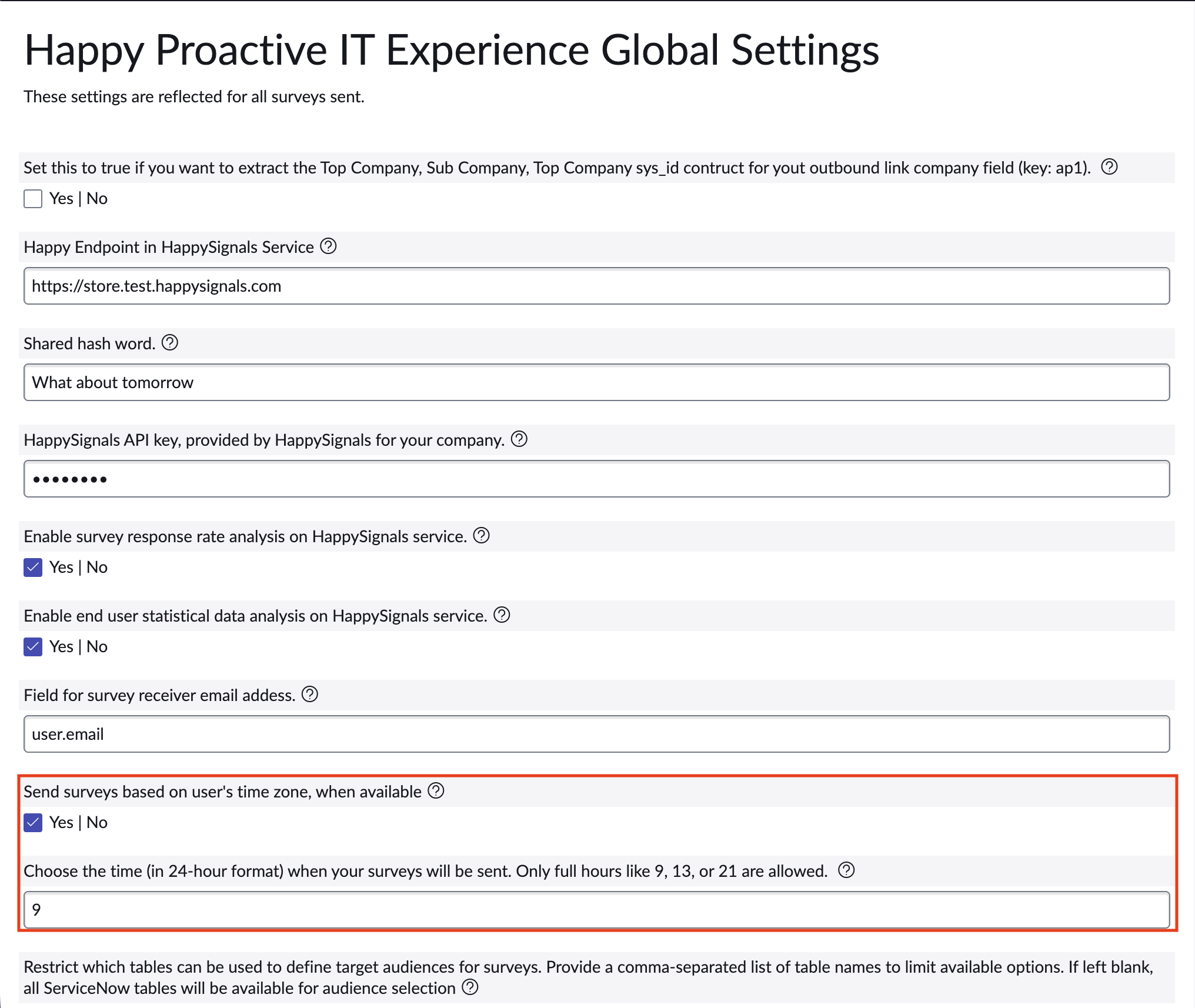
- Navigate to HappySignals Proactive → Integration Settings → General Properties.
- Enable recipient timezone-based scheduling if not already enabled.
- Configure the preferred survey delivery hour (for example, 09:00 local time).
- Save the changes.
- The survey processing job will automatically schedule surveys based on each recipient's local timezone. If the selected time has already passed for the current day, the survey will be scheduled for the next available day. Weekends are skipped automatically.
Example
If survey delivery is configured for 09:00 local time, employees in different countries will each receive the survey at approximately 09:00 in their own time zone.
This ensures that surveys are delivered during normal working hours, regardless of geographic location, and helps maximize survey visibility and response rates. The feature is particularly valuable for global organizations operating across multiple regions and time zones.
- Tip: We recommend scheduling proactive surveys for the beginning of the workday whenever possible. Our response rate analysis shows that employees are most likely to engage with surveys during working hours, and a significant portion of responses are received within the first few hours after delivery.
Screenshots:
- Integration Settings → General Properties
- Survey Delivery Hour configuration
Product roadmap note
As HappySignals continues to evolve its proactive survey capabilities, additional delivery-time optimization options may become available. These capabilities could help organizations benefit from response-rate insights without needing to manually determine the most effective delivery timing.