HappySignals Onboarding Support
A path through onboarding, from your first look at the platform to running it as business as usual — with the resources for each step gathered in one place. Work through it at your own pace; your Customer Success Team is there if you need a hand.
1. Getting started
The non-technical track. Before any configuration begins, confirm your objectives, understand what the onboarding process looks like, and get the right people briefed — including your Service Desk.
-
Start Here: How Is HappySignals Taken Into Use? — ARTICLE
The orientation page — what happens first, and in what order. -
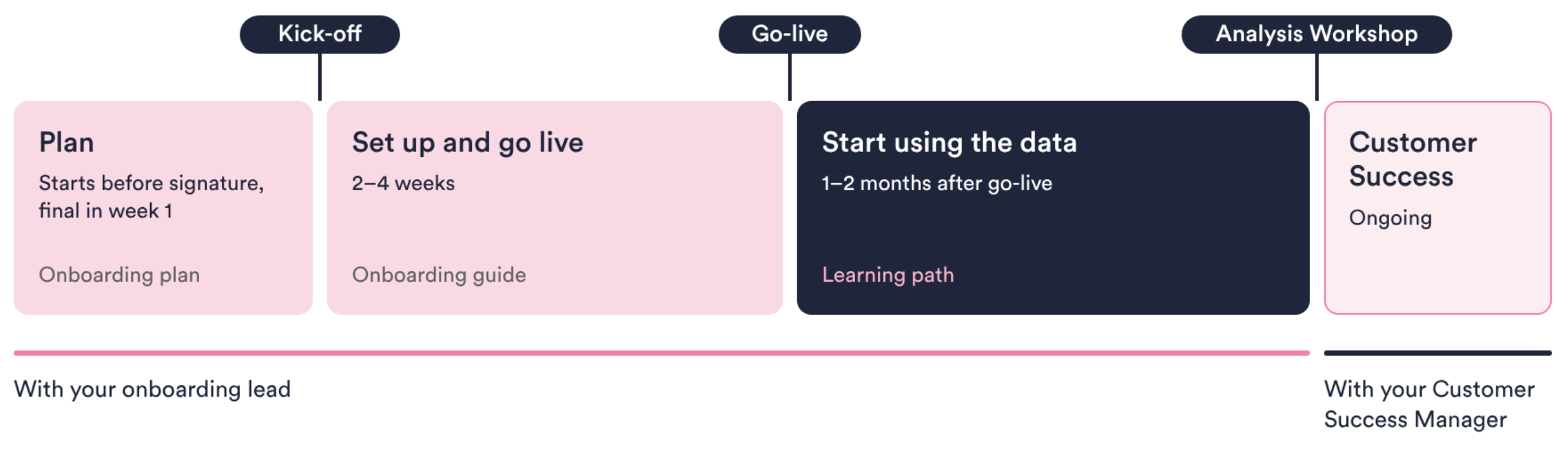
What Does the HappySignals Onboarding Look Like? — ARTICLE
A walkthrough of the full onboarding journey and its key milestones. -
Customer Success Video Series — VIDEO
Short videos introducing how HappySignals' Customer Success team works with you. -
Before Starting: Basics, People, Environments — ARTICLE
What to have ready before implementation begins. -
Setup Phase Meetings: Who Should Participate? — ARTICLE
The meetings you'll need during setup, and who from your side should be in the room. -
Key Fields in Data Mapping for Getting Value from HappySignals — ARTICLE
Written for your technical team, but the decisions it covers — what to segment by, what to benchmark — are business calls. Worth a joint read. -
HappySignals Enablement Guide 2026 — DECK
A downloadable slide deck covering enablement essentials. -
How Should Service Desk Agents Be Briefed? — ARTICLE
What your Service Desk needs to know before feedback starts arriving.
2. Installation, configuration & testing
The technical track. Your admin team connects HappySignals to your ITSM tool, configures it, and verifies everything is working before go-live.
-
Guided Tour: Self-Service Onboarding — COMPREHENSIVE
Covers installation, configuration, and testing end to end for a self-service setup.
3. Understand the platform
After go-live — or already, in a test environment — this is where you learn to read what HappySignals is showing you.
-
Getting Started with HappySignals — COMPREHENSIVE
The full platform primer: Dashboard, Measure, Experience, Hotspots, Feedback, Benchmarks, and more, all linked from this one article.
4. Our continuous support
HappySignals actively helps you get value from your data — plus the wider context of experience management, for when you want the “why” behind the platform.
-
Q&A Session —
Checking in after Go-Live to see if everything is working and the data you are getting looks good. Answering your first "how do I?" questions. More details to follow. -
ITXM Foundation Course — LEARNING
An introductory course on IT Experience Management as a discipline. -
The ITXM Framework — LEARNING
The framework behind HappySignals' approach to experience management. -
Global IT Experience Benchmark 2026 — LEARNING
How your results compare against industry-wide benchmark data. -
ITXM Best Practices Library — LEARNING
A library of best practices for running experience management well. -
The Analysis Workshop — ARTICLE
How to turn HappySignals data into decisions — onboarding's closing workshop.
5. After onboarding — business as usual
Even though the onboarding phase ends, the relationship continues. This is what ongoing use of HappySignals looks like.
-
Customer Success Management —
You will always have someone to turn to, with technical and generic questions. More details to follow. -
Release Notes — ARTICLE
What's new in the platform, updated regularly. -
Activating Inactive Measurement Areas — ARTICLE
How to expand measurement as your rollout grows. -
Ask — Conversational AI — AI
HappySignals' AI-powered Experience Advisor — explore your data in natural language.
