
Overview
- Why do these discrepancies occur
- How HappySignals channel benchmarking works
- What needs to be done in ServiceNow integrations to fix the issue
- The recommended and alternative implementation options
How Channel Data Is Collected
- The Channel field in HappySignals is mapped via dot‑walking to the ServiceNow
contact_typefield - The returned value is exactly what exists on the incident or request record
contact_type it is passed through as‑is.How Channel Benchmarking Works in HappySignals
- Portal
- Phone
- Chat
- Walk In
-
Virtual Agent
Note on Virtual Agent
Virtual Agent is supported as a channel value and can be collected in the data mapping. However, it is not currently shown as a visible option on the Benchmark page, as an official benchmark for Virtual Agent has not yet been generated. It was added to the guidance to allow customers to start collecting the data ahead of future benchmark availability.
These values are used to ensure "apples to apples" comparisons across customers.
- Is excluded from the official benchmark calculation
- Still appears in reporting and experience views
- Causes channel distributions not to add up to 100%
Typical Root Cause of Discrepancies
- Instant Message
- IM
- Teams
- Mobile
- Walkup Interface
- Tech Café
- Only tickets with benchmark‑compatible channel values are included
- The benchmark percentage appears lower than the actual channel usage
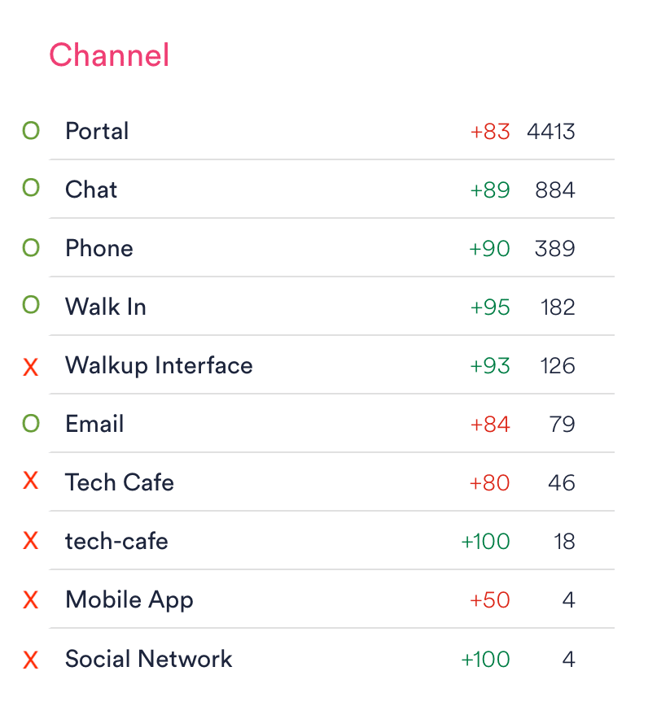
- Benchmark channels cover only 70–80% of tickets
- Remaining tickets belong to non‑standard channel values
Recommended Solution: Normalize Channels in the Integration
How It Works
- Keep the existing dot‑walk mapping from
contact_type - Extend channel mapping logic in HappyCustomConfig
- Convert non‑standard values into benchmark‑compatible values
Example Logic
if (contact_type == 'Mobile') {
  contact_type = 'Phone';
}
Preserving Original Channel Values (Recommended)
If the original ServiceNow channel values are still needed for reporting or analysis, they should be preserved separately while sending a standardized value for benchmarking.
This is done by:
- Storing the original ServiceNow
contact_typevalue in a separate field (for exampleconf.org_channel) - Sending a benchmark‑compatible value in
conf.contact_type
Example implementation
var raw = this.__getFieldValue(obj, 'contact_type');

conf.org_channel = raw;          // original ServiceNow value

conf.contact_type = raw;         // default: same value

if (raw == 'Mobile') {

  conf.contact_type = 'Phone';   // standardized benchmark value

}
Result
conf.org_channelcontains the original ServiceNow channel value (full data fidelity)conf.contact_typecontains a standardized, benchmark‑compatible channel value- Only the standardized value is used for channel benchmarking
This approach ensures accurate and comparable benchmark results while preserving the original channel information for reporting and analysis.
Alternative Option: Modify ServiceNow Channel Values (Not Recommended)
contact_type only contains benchmark values.Risks
- May impact:
- Existing reports
- Flows and automations
- Integrations
- Operational processes
- Requires stronger governance and approvals
Guiding Principle
It is safer to adapt the HappySignals integration to the existing ServiceNow hierarchy than to modify ServiceNow to fit HappySignals requirements.
Summary
- HappySignals receives raw
contact_typevalues from ServiceNow - Only a fixed set of channel values is benchmarked
- Standardizing channel values at the integration script level
- Mapping non‑standard values to benchmark categories
- Normalize channels in HappyCustomConfig
- Preserve original values in a separate field if needed